


Plato Medical is a clinic management system used by thousands of GP, aesthetic, dental and specialist clinics across Singapore and Malaysia. It holds the patients, the appointment calendars and the invoices. Patients, meanwhile, write to the clinic on WhatsApp: to ask a price, to book, to move an appointment, to ask whether their invoice was paid.
Between the two sits the front desk, reading a WhatsApp message, looking the patient up in Plato, checking a doctor's calendar, typing a reply, and then typing the booking into Plato. Connecting WhatsApp to Plato takes that copying out of the job.
We build Volty, an AI agent for clinics and other businesses that is a Plato Medical Approved Partner, and clinics such as Cutis Medical Laser Clinics and Prologue Clinic run their WhatsApp on it with Plato connected. This guide covers what a Plato and WhatsApp integration can do, what it should not do, what Plato's API allows, and how to set one up.



 Plato Medical Approved Partner
Volty is an Official Meta Business Partner, so clinics connect their WhatsApp number to Volty directly on Meta's WhatsApp Business Platform, and a Plato Medical Approved Partner, listed in Plato's own app directory.

What Plato holds, and what WhatsApp needs from it
A WhatsApp conversation about an appointment needs four things from Plato:
The patient. Plato stores each patient's phone numbers, so the patient writing in can be found by their WhatsApp number, and a new patient can be created.
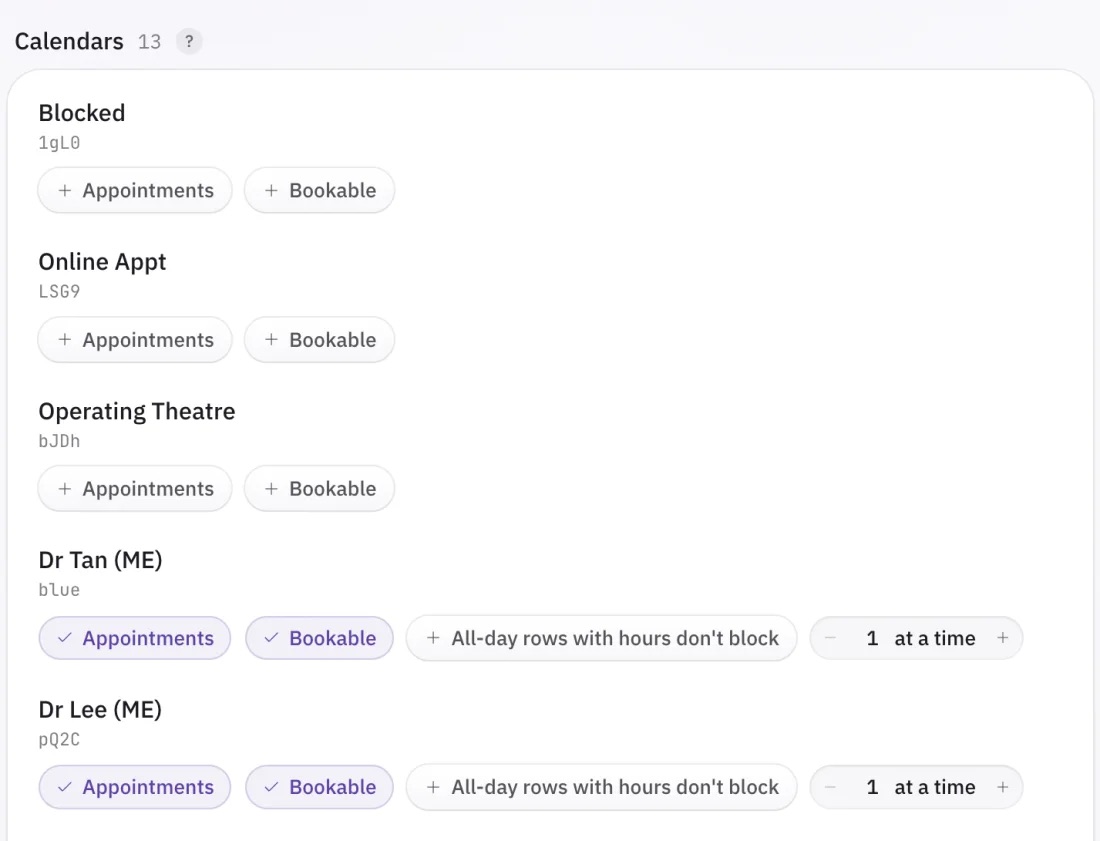
The calendars. In Plato every doctor, therapist or room is a calendar, and some calendars (blocked time, an operating theatre, online bookings) are not for patients to book into.
The appointments, to find free time and to see what a patient already has booked.
The invoices, for the patients who ask what they owe or whether a payment went through.
Plato stays the clinic's system of record. WhatsApp is where the patient talks to the clinic, and the integration reads from Plato and writes back to it, so the front desk keeps working in Plato as it does today and sees every booking made on WhatsApp in the same calendar.
What you can automate
These are the jobs clinics hand to Volty once Plato is connected, in the order most clinics turn them on.
| Job | What happens in Plato |
|---|---|
| Answering questions about prices, treatments and opening hours | Nothing. Answers come from the clinic's website, price list and FAQs |
| Booking a new appointment | The patient is found by their WhatsApp number or created, and the appointment is written into the right calendar |
| Rescheduling | The appointment moves to the new time, keeping its length |
| Cancelling | The appointment is removed or moved to the clinic's cancelled calendar, whichever the clinic uses |
| Appointment reminders | Tomorrow's appointments are read and each patient gets a WhatsApp reminder |
| Follow-ups and recalls | Patients due for a 6-month or 12-month check-in are messaged to book again |
| Invoices and payment reminders | Invoices are sent on WhatsApp or email and unpaid ones are followed up, through Plato or the clinic's accounting software such as Xero or QuickBooks |


Booking, rescheduling and cancelling
A booking is where most of the front desk's time goes, and it is where the integration has to follow the clinic's rules exactly. When a patient asks for an appointment, Volty finds them in Plato by the number they are messaging from, works out how long the treatment takes from the clinic's own rules (a check-up 30 minutes, scaling 45, an extraction 60, with 15 minutes between treatments, for example), and offers only times that are free for that whole length, inside opening hours, on the calendars the clinic has made bookable. When the patient picks a time, Volty checks the slot is still free in Plato and books it.
A visit that spans more than one calendar, such as preparation with a therapist and then a doctor, is booked as back-to-back appointments on each calendar, and moved together if the patient reschedules.
Rescheduling and cancelling follow the clinic's notice period. If changes are allowed up to 24 hours before, Volty makes the change itself before that point and hands the conversation to the front desk inside it. Clinics usually ask Volty to offer a new time before processing a cancellation, which keeps more appointments on the calendar.
Reminders and follow-ups
Reminders are where a Plato connection pays for itself fastest, because they are a daily job nobody wants. Each day Volty reads the next day's appointments from Plato and sends each patient a reminder on WhatsApp, and patients who reply to move the appointment are handled in the same conversation. Follow-ups work from the visit date: a patient seen six or twelve months ago gets a check-in asking them to book again. Cutis sends hundreds of these reminders and follow-ups a day this way.
A new reminder runs as a dry run first, listing the appointments it found and the messages it would send without sending any, so the clinic can check the wording and the list before it goes live.
Messages after hours
A large share of clinic enquiries arrive in the evening and on weekends, when nobody is at the front desk. At Prologue Clinic, after-hours enquiries were about 30% of the total; with Volty answering and booking into Plato at any hour, those patients now get a reply in seconds rather than the next morning.
What should stay with your staff
An AI agent on a clinic's WhatsApp should handle the administration around an appointment and leave anything medical to people. Set it to hand these conversations to the front desk:
Symptoms, and whether something is urgent. A patient describing chest pain should be told to call the clinic or emergency services, not offered a slot next Tuesday.
Questions about medication, test results or a diagnosis.
Complaints and refunds.
Changes inside the notice period, and anything the clinic's rules leave to the front desk's judgement.
Every clinic should also start in draft mode. In draft mode the AI writes each reply and a staff member approves it with one click, edits it, or writes their own. Once the team trusts the replies for a type of conversation, those can go out automatically, and the rest stay as drafts. At Cutis about half of patient messages now go out automatically and the other half are approved by staff in one click.
Connect Plato to your WhatsApp.
7 days free, no credit card.
What the Plato API allows
If you are building the integration yourself or assessing a vendor, these are the parts of Plato's API that shape what is possible.
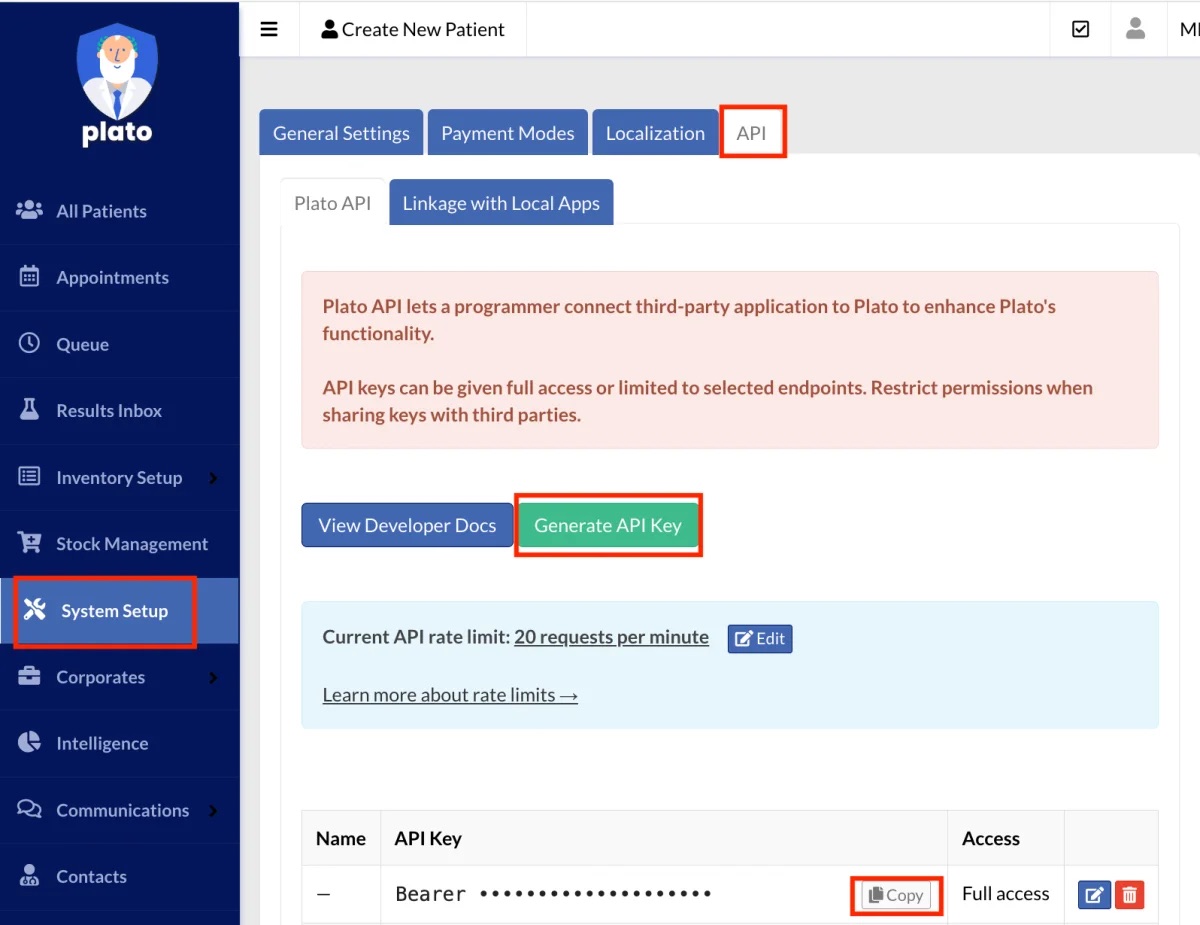
One API key per clinic. Only a Plato admin user can create a key, under System Setup, General Settings, API, Generate API Key. A key has either full access or access to a chosen list of endpoints. A key limited to selected endpoints will refuse anything outside its list, so an integration that books, moves and cancels appointments needs each of those endpoints ticked, or full access.
A database name. Every request to clinic.platomedical.com/api/{database} names the clinic's Plato database. It is not shown anywhere in Plato's normal screens; it is in Plato's welcome email. A wrong database name fails the same way as a wrong key, which is the most common reason a first connection fails.
A rate limit. Each clinic's API allows 20 requests a minute by default, shared by everything that uses the clinic's key. That is enough for a clinic's WhatsApp, but a clinic that also runs other Plato integrations, or has very high volume, can buy a higher limit from Plato for a monthly fee, priced under System Setup, API.
Webhooks that say what changed, not what it changed to. Plato can notify an integration when an appointment or patient changes, but the notification carries only the record's id, so the integration fetches the record again. Plato also stops sending to a receiver that fails repeatedly, and a change made through the API does not send a notification at all. A reliable integration therefore re-reads Plato on a schedule as well as listening for changes; Volty does both, every five minutes and on every change Plato reports.
No cancel button. The API has no "cancel" action. An appointment is either deleted or moved to the calendar the clinic uses for cancellations. Deleting it removes the record the front desk may rely on later, so most clinics choose the cancelled calendar, and an integration should ask.
Plato's own WhatsApp add-on sends messages; it does not converse. Plato can send templated WhatsApp messages such as reminders. Answering a question, finding a slot that fits a treatment and booking it while the patient waits is what a connected platform adds.
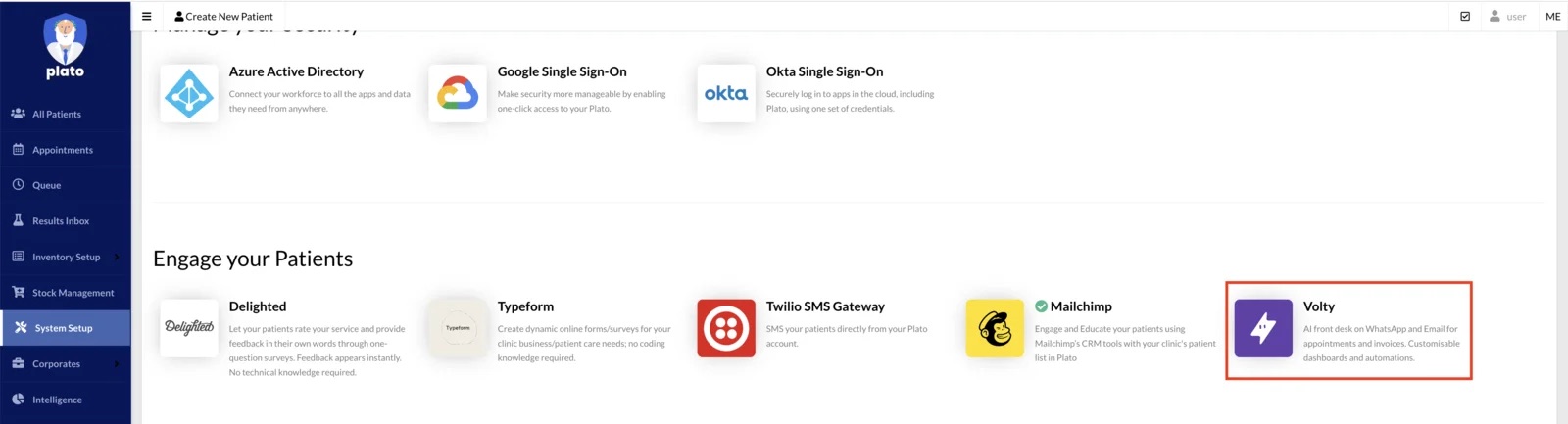
Partners. A clinic can have a developer build against its own key. A vendor connecting many clinics to Plato should be one Plato works with, and you can check: Plato lists approved partners in its app directory under System Setup.
Patient data and the PDPA in Singapore and Malaysia
Singapore and Malaysia each have a Personal Data Protection Act, and both hold a clinic responsible for the patient data it passes to a vendor. So a clinic connecting Plato to anything should ask what patient data leaves Plato and where it is kept. For Volty the answer is narrow by design: Volty keeps a copy of the clinic's appointments and each patient's name, phone numbers and chart number, because that is what booking needs. Clinical notes, identity numbers (NRIC in Singapore, MyKad in Malaysia), and dates of birth never reach that copy. Invoices are read live from Plato only when a patient asks about one. Appointment notes stay out of it unless the clinic's admin turns them on.
Volty also masks phone numbers, emails and Singapore NRIC numbers before a message reaches the AI model, is penetration tested every year by third-party auditors, and holds the Cyber Essentials mark from the Cyber Security Agency of Singapore. More detail is on our security page.
How to set it up
With Volty, a clinic connects Plato and WhatsApp itself, usually in a day or two.
Start a free 7-day sandbox trial. No credit card is needed, and the trial's data is deleted afterwards unless you keep it.
Connect Plato with an API key with full access, and the database name from Plato's welcome email.
Choose which Plato calendars patients may book into, and how many patients each takes at a time. Calendars such as Blocked, Online Appt or Operating Theatre are left alone.
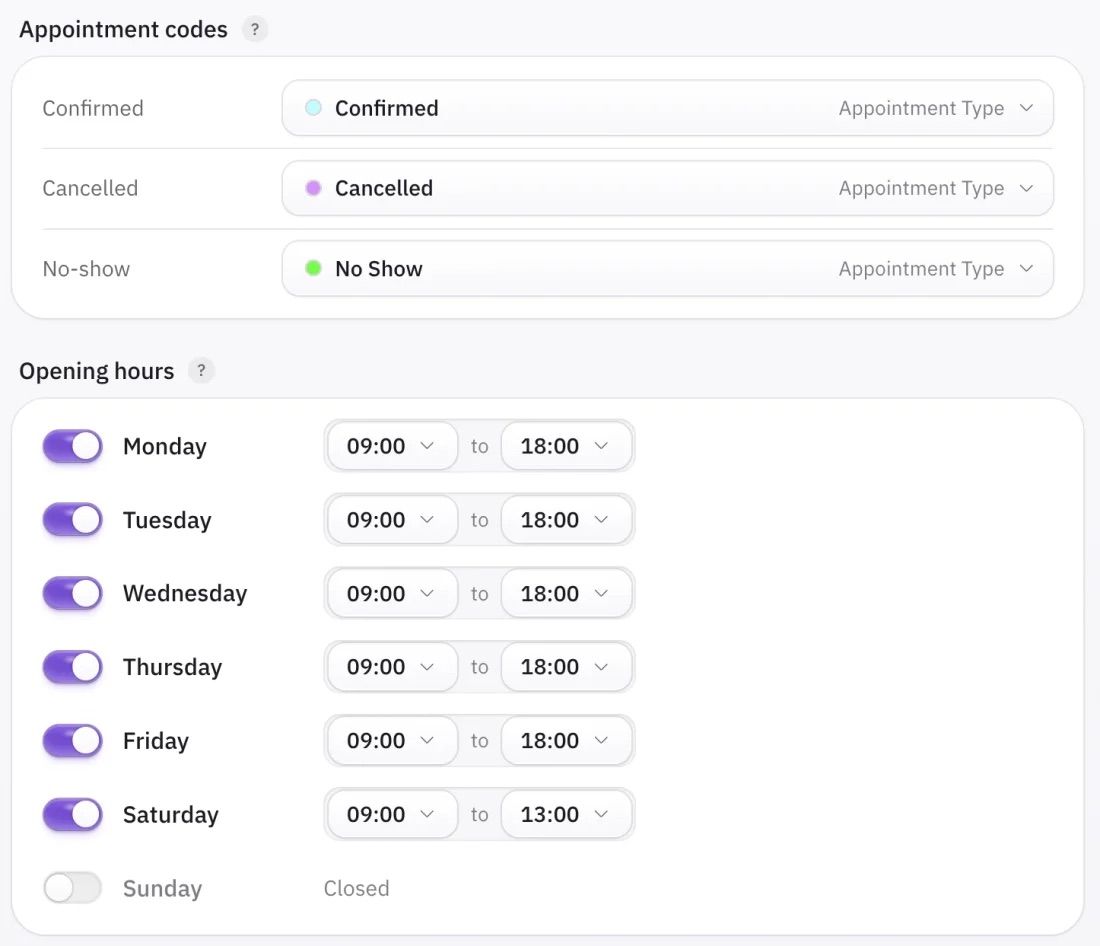
Tell Volty your opening hours, treatment lengths and notice period in a chat, the way you would brief a new receptionist. Volty saves them as the clinic's booking rules.
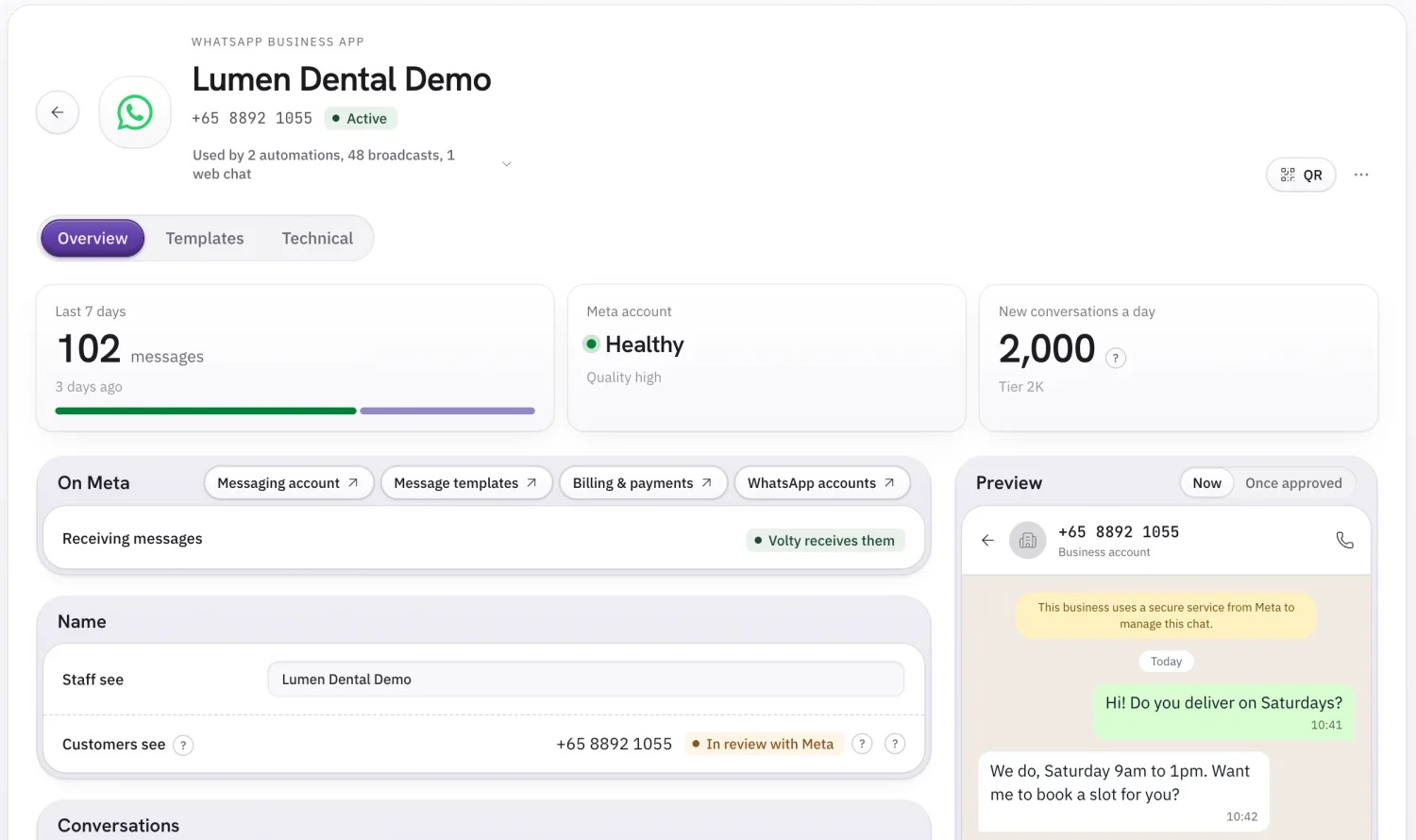
Connect your WhatsApp number by logging in with Facebook. A number already on the WhatsApp Business app can stay on the phone as well.
Start in draft mode, check the replies for a few days, then let each type of conversation go live when you are ready.
What it costs
A Plato and WhatsApp integration has three costs:
The platform. Volty's plans include seats, active contacts and AI credits, and the prices for your country are on our pricing page.
Plato's API, which is included at the default 20 requests a minute. Only a clinic that needs more pays Plato for a higher limit.
WhatsApp's own charges, billed by Meta to the clinic's Meta Business account with no mark-up from Volty. Replies in a conversation the patient started are free; templated messages the clinic starts, such as reminders, are charged per message at the rate Meta sets for the patient's country: about US$0.016 for a reminder and US$0.073 for a marketing message to a Singapore number, and about US$0.014 and US$0.086 to a Malaysian number. Our WhatsApp pricing calculator works out a monthly figure.
Build it yourself, or use a platform
A developer can connect WhatsApp to Plato for one clinic; the API calls are not the hard part. The work is in everything around them: the WhatsApp Business API account and its message templates, handling Plato's rate limit when several tools share a key, re-reading Plato because webhooks get dropped, offering only slots that fit a treatment's length, matching patients by phone number when Plato stores it in different formats, handing conversations to staff, and keeping all of it running when Plato or Meta changes something. A custom build usually takes weeks and needs someone to look after it.
A platform that already connects to Plato takes a day or two to set up and is maintained for you. Cutis moved to Volty from respond.io because respond.io could not connect to Plato; with Volty connected, its first reply time is now 24 seconds on average.
Summary
Connecting WhatsApp to Plato Medical lets a clinic hand its routine front-desk work to an AI agent: answering questions, booking, rescheduling and cancelling into Plato's calendars, reminders, recalls and invoices. Medical questions, complaints and anything inside the notice period stay with staff, and draft mode keeps a person approving replies until the clinic trusts them. When choosing how to connect, check the vendor is an approved Plato partner, ask what patient data it copies out of Plato, and make sure it follows your calendars, treatment lengths and notice period rather than its own.
See how Volty works with Plato on our Plato Medical integration page, or read how Cutis and Prologue Clinic use it.
Frequently asked questions
Can WhatsApp be connected to Plato Medical?
Yes. Plato has a REST API that lets outside software read and write patients, appointments, calendars and invoices, using an API key the clinic's admin generates in Plato. A WhatsApp platform connected through that key can find the patient by their WhatsApp number, offer free slots, book, move or cancel appointments in Plato, and send reminders and follow-ups. Plato stays the clinic's record, and WhatsApp is where the patient talks to the clinic.
Does this work for Plato clinics in Malaysia?
Yes. Plato's API is the same for clinics in Singapore and Malaysia, and Volty connects WhatsApp numbers from either country. Volty replies to patients in the language they write in, including English, Malay, Chinese and Tamil, and Meta bills WhatsApp messages at the rates for the patient's country.
Does Plato have its own WhatsApp feature?
Plato has a WhatsApp add-on for sending templated messages, such as reminders, from Plato. It sends messages; it does not hold a conversation. Answering a patient's questions, finding a free slot that fits the treatment, and booking or moving the appointment while the patient waits needs a messaging platform or an AI agent connected to Plato's API.
Do I need an approved Plato partner to connect WhatsApp?
A clinic can have a developer build against its own Plato API key. A vendor that connects many clinics to Plato should be one Plato works with, and you can check: approved partners appear in Plato's own app directory under System Setup. Volty is a Plato Medical Approved Partner and is listed there under Engage your Patients.
What does Volty need to connect to Plato?
The clinic's Plato API key and database name, the calendars Volty may book into, the clinic's opening hours and treatment lengths, and the notice period for changes. The API key is generated by a Plato admin under System Setup, General Settings, API. The database name is in Plato's welcome email.
Does Volty store patients' NRIC numbers or clinical notes?
No. Volty keeps a copy of the clinic's appointments and each patient's name, phone numbers and chart number. Clinical notes, identity numbers (NRIC in Singapore, MyKad in Malaysia), and dates of birth never reach that copy. Invoices are read live from Plato only when a patient asks about one.
How up to date is what Volty sees in Plato?
Volty refreshes appointments from Plato every five minutes and whenever Plato reports a change, and it checks a slot is still free in Plato at the moment it books.
What should not be automated in a clinic's WhatsApp?
Anything that needs clinical judgement: symptoms, whether something is urgent, medication questions and results. Complaints, refunds and changes inside the clinic's notice period also belong with staff. Set the AI agent to hand those conversations to the front desk, and start in draft mode, where staff approve each reply before it is sent.
How much does it cost to connect Plato to WhatsApp?
There are three parts. Volty's plan, listed at voltade.com/pricing with a free 7-day trial. Plato's API, which is included at Plato's default rate of 20 requests a minute, with higher rates on a paid monthly add-on from Plato. And Meta's WhatsApp message charges, billed by Meta directly: replies inside a conversation the patient started are free, and templated messages such as reminders are charged per message.