

Meta Business Agent is priced at US$2.00 per million tokens, a single global rate that covers both the AI work and the delivery of each WhatsApp reply. Meta estimates a typical reply at 20,000 to 25,000 tokens, so most businesses pay about 4 to 5 US cents for every message the agent sends.
That number is easy to quote and harder to budget, because the token count changes with every answer and several of WhatsApp's free allowances do not apply to the agent. This guide explains the meter, sets out what is charged and what is free, works through monthly budgets at four volumes, compares the bill with running a third-party AI agent on the same number, and shows why one business, The Bon Pet, moved from Meta Business Suite to Volty. Every Meta figure comes from Meta's WhatsApp pricing documentation and its Meta Business Agent developer pages. Meta can change rates on the first day of any quarter, so check its pages before you commit a budget.
The meter in one table
WhatsApp has five message categories. Four of them (marketing, utility, authentication and service) are priced per message, with a rate that depends on the category and the recipient's country. The fifth, Meta Business Agent, was added on 1 July 2026 and uses a different meter.
| Item | Meta Business Agent | Service messages |
|---|---|---|
| What it covers | Non-template replies written by Meta's own agent | Non-template replies sent by your staff or a third-party AI |
| How it is priced | US$2.00 per million tokens, one global rate | A fixed rate per delivered message, set per country |
| Typical cost per message | About 4 to 5 US cents | US$0.0034 to a US or Canadian number on Meta's October 2026 card |
| Monthly free tier | None | 1,000 per business phone number |
| Free entry point window | Still charged | Free |
| Volume tiers | Do not apply | Do not apply |
Each message carries one category and therefore one charge. A reply from Meta's agent is billed by tokens and nothing else. When the agent hands a chat to a person and that person types an answer, the person's message is a service message.
What a token is and which ones count
A token is a small piece of text that a language model reads or writes. To answer a customer, the agent reads the question, the earlier messages in the chat and the parts of your business information it needs, then writes the reply. Meta counts the input tokens and the output tokens. It does not charge for cache tokens, the text a model reuses from a previous step without processing it again.
That is why two replies in the same chat can cost different amounts. A one-line answer about opening hours reads little and writes little. A step-by-step answer near the end of a long conversation reads the whole history and writes more. Meta's own examples put a four-message exchange about opening hours at roughly 80,000 tokens, about 16 to 20 US cents in total, and a ten-message walk-through of an assembly problem at roughly 250,000 tokens, about 40 to 50 US cents.
What stays charged and what is free
Three rules shape the bill more than the headline rate does.
No free tier. Since 1 October 2026, every business phone number gets 1,000 free service messages a month. Meta Business Agent messages are a separate category, so none of the agent's replies use that allowance.
No free window. When a customer reaches you from a Click to WhatsApp ad and you reply in time, Meta opens a free entry point window that can stay open for up to 7 days. Marketing, utility, authentication and service messages cost nothing in it. Meta's documentation states that Meta Business Agent messages remain charged there.
No volume discount. Utility and authentication messages get cheaper as a business sends more of them in a month. The token rate stays at US$2.00 per million however many replies you send.
Two things are free for everyone: messages customers send to you, and messages that are never delivered. Meta bills only delivered messages from the business.
If you run ads that click to WhatsApp, the second rule matters most. A team that answers ad leads by hand pays nothing for those replies during the window, while the same replies written by Meta's agent cost the token rate. Our guide to WhatsApp ads explains how that window opens and closes.
Monthly budgets at four volumes
To budget, count the replies the agent will send in a month. A chat in which the agent answers four times is four charged messages. The table below multiplies Meta's typical range of 20,000 to 25,000 tokens a reply by the US$2.00 rate.
| Agent replies a month | Tokens at 20,000 to 25,000 a reply | Meta Business Agent cost a month |
|---|---|---|
| 500 | 10 to 12.5 million | US$20 to US$25 |
| 2,000 | 40 to 50 million | US$80 to US$100 |
| 10,000 | 200 to 250 million | US$400 to US$500 |
| 50,000 | 1,000 to 1,250 million | US$2,000 to US$2,500 |
The token rate is global, so the result is the same whether your customers are in Mexico, Germany or the United States. The rest of your WhatsApp bill still depends on the country: marketing templates, order updates and staff replies past the free 1,000 are billed at the rates for the recipient's market. Our WhatsApp Business API pricing guide lists those rates and works out full monthly bills.
A worked conversation
Take an online store that sells to customers in the United States. A customer receives an order-shipped update and replies to ask whether they can change the delivery address. Meta's agent answers twice, then hands the chat to a staff member, who sends two messages to confirm the change. Here is what Meta charges:
| Message | Category | Charge |
|---|---|---|
| Order-shipped template | Utility | US$0.0034 |
| Agent reply 1 | Meta Business Agent | About US$0.04 to US$0.05 |
| Agent reply 2 | Meta Business Agent | About US$0.04 to US$0.05 |
| Staff reply 1 | Service | Free while the number is inside its 1,000 a month |
| Staff reply 2 | Service | Free while the number is inside its 1,000 a month |
| Total | About US$0.08 to US$0.10 |
The total comes to US$0.0834 to US$0.1034, which rounds to about 8 to 10 US cents. Nearly all of it is the two agent replies, even though the agent did not finish the job.
Before you can switch it on
Meta Business Agent has eligibility rules and a billing step, and both decide whether the price above applies to you at all.
Eligibility
Meta's developer documentation lists these conditions for a phone number:
The business is in a supported vertical. Meta excludes seven: alcohol, finance, gambling, government, health, matrimony services and over-the-counter drugs. The account also needs a valid business category set.
The number is on the WhatsApp Business Platform, either directly or through a partner. Meta also offers an agent inside the WhatsApp Business app, set up from the app's own tools.
The account and its business are not restricted or banned.
The business is based in a country where Meta offers the agent, and meets Meta's trust and verification requirements.
No other AI agent is already active on the number. An existing authorised agent integration blocks Meta Business Agent.
Meta provides an eligibility check through its API, which is the final word for any given number. A clinic, an insurer or a lender will fail the vertical check whatever its budget, so for them the comparison in the next section is the whole decision.
Billing
Meta needs a credit or debit card, or an eligible credit line, attached in Billing Hub before the agent can answer every customer. Without a payment method, you can run the agent for an allowlisted group of test contacts, which is a sensible way to measure real token use before you go live. A business that connects through a solution partner should ask the partner which account Meta will bill.
Turning the agent on also changes how conversations are routed on the number. Where Meta sets up the routing automatically, its agent becomes the first responder for new chats and any other connected tool moves to standby. Ask your inbox provider whether its tool keeps working in that role before you switch.
Meta Business Agent or a third-party AI agent
A third-party AI agent sends its replies as service messages. Those use the free 1,000 a month first and are then billed at the service rate for the customer's country. The vendor charges for the AI separately, usually through a monthly plan with an allowance of AI usage.
Meta's own pricing page compares the two for 10,000 high-complexity replies to customers in Brazil. It estimates a third-party AI at about 9 US cents a reply plus 0.68 US cents of delivery, around US$968 in total, against US$400 to US$500 for its own agent. That comparison is Meta's own estimate, and it ignores the free 1,000 service messages. The fair reading is that per AI reply, at high volume, Meta's agent is often cheaper on the meter alone.
Most businesses choosing between the two weigh other costs as well:
Channels. Meta's agent works inside Meta's own apps, and the pricing here is for WhatsApp. If customers also write by email or on your website, you need another tool for those conversations anyway.
The team inbox. When the agent hands over, someone has to pick up the chat in a shared inbox with an owner on every conversation. Meta's agent does not supply that inbox.
Connecting your systems. Meta's agent can call your own APIs, but a developer defines each connector, with its address, authentication and operations, and maintains it.
Ad traffic. If most chats start from Click to WhatsApp ads, replies from staff or a third-party agent are free in the window, and replies from Meta's agent are not.
Eligibility. Regulated businesses cannot choose Meta's agent at all.
For a side-by-side of setup, integrations and handover, see Volty vs Meta Business Agent. If you are still deciding whether you need an agent or a simpler bot, our WhatsApp AI agent guide covers what each can do and the risks to plan for.
How to keep the bill predictable
Test with an allowlist first and read the token use per reply from your own traffic, then multiply by your expected monthly replies.
Keep your business information short and specific. The agent reads it to answer, so long, repetitive documents raise the input tokens on every reply.
Hand off early on topics the agent cannot settle. Each extra attempt is a charged message, while a staff reply inside the free 1,000 costs nothing.
Write one complete answer where a reply would otherwise be split across several short messages. Each delivered message is charged.
Check which chats start from ads. In the free entry point window, a human or third-party reply is free and the agent's reply is not.
Review the rate each quarter. Meta can change prices only on 1 January, 1 April, 1 July and 1 October, and publishes the new card ahead of time.
How The Bon Pet used Meta Business Suite
The Bon Pet cooks fresh food for dogs and cats in Singapore and sells it through a Shopify store, much of it by subscription. It started on Meta Business Suite and has since moved to Volty.
Meta Business Suite is Meta's free tool for running a Facebook Page, an Instagram account and a WhatsApp number from one place. It gave The Bon Pet:
One inbox for Messenger, Instagram and WhatsApp messages.
Automated replies: an instant reply, an away message and answers to frequently asked questions.
A planner for scheduling Facebook and Instagram posts, with ads and insights alongside.
Meta Business Agent, the AI agent this guide prices, switched on from the same place.
The Bon Pet set the agent up from four screens:
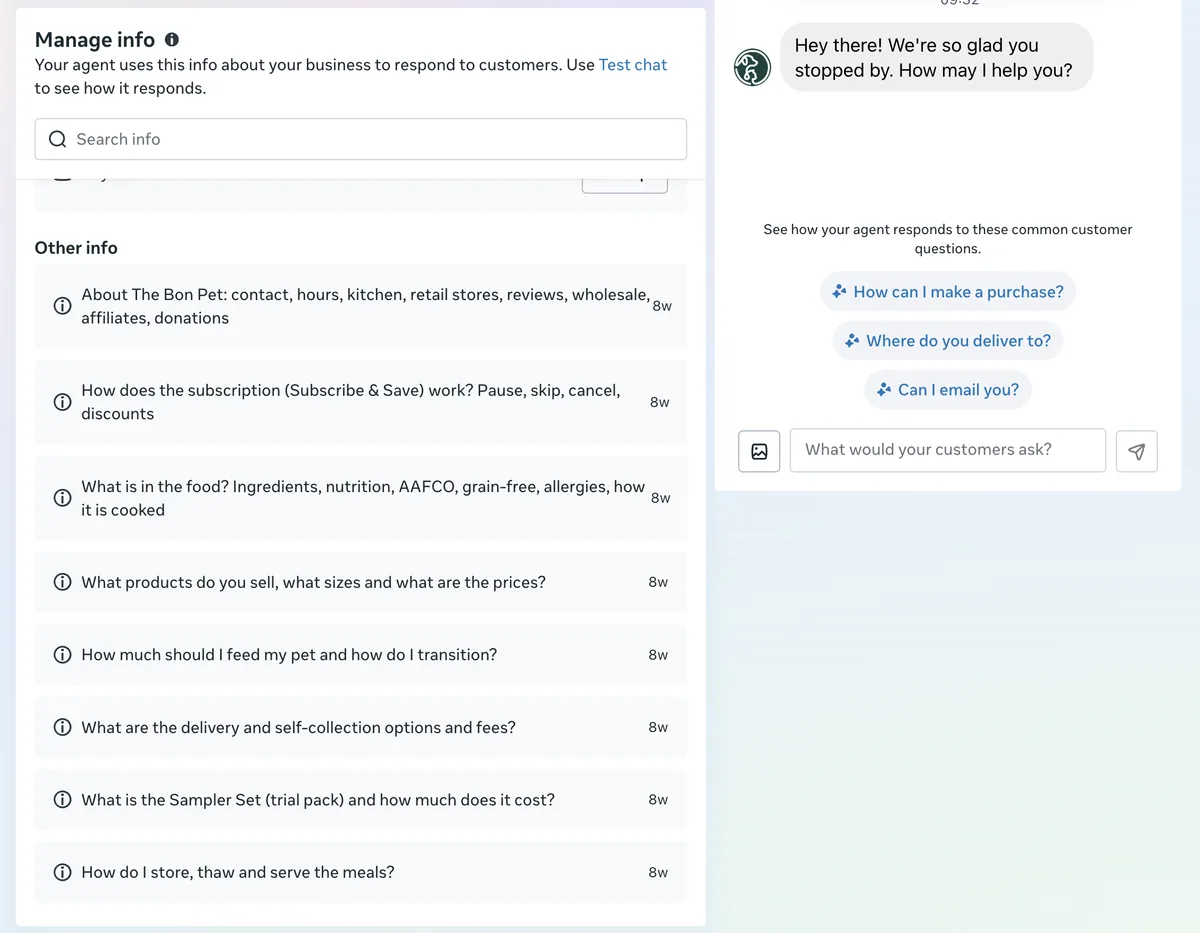
Your info. A product catalogue of 17 items, a price list, a connected Google Drive, and eight written answers: about the company, how the subscription works, what is in the food, products and prices, how much to feed, delivery and self-collection, the sampler set, and how to store and serve the meals.
Instructions. One for collecting leads, two for tone of voice, one listing topics the agent should avoid and transfer to a person, and two custom instructions.
Audience. Meta offers four choices: everyone, anyone messaging for the first time, anyone messaging from ads, or only your team. The Bon Pet chose "Anyone messaging for the first time".
Schedule and follow-up. The agent was always available, and it followed up once, an hour after a customer stopped replying.
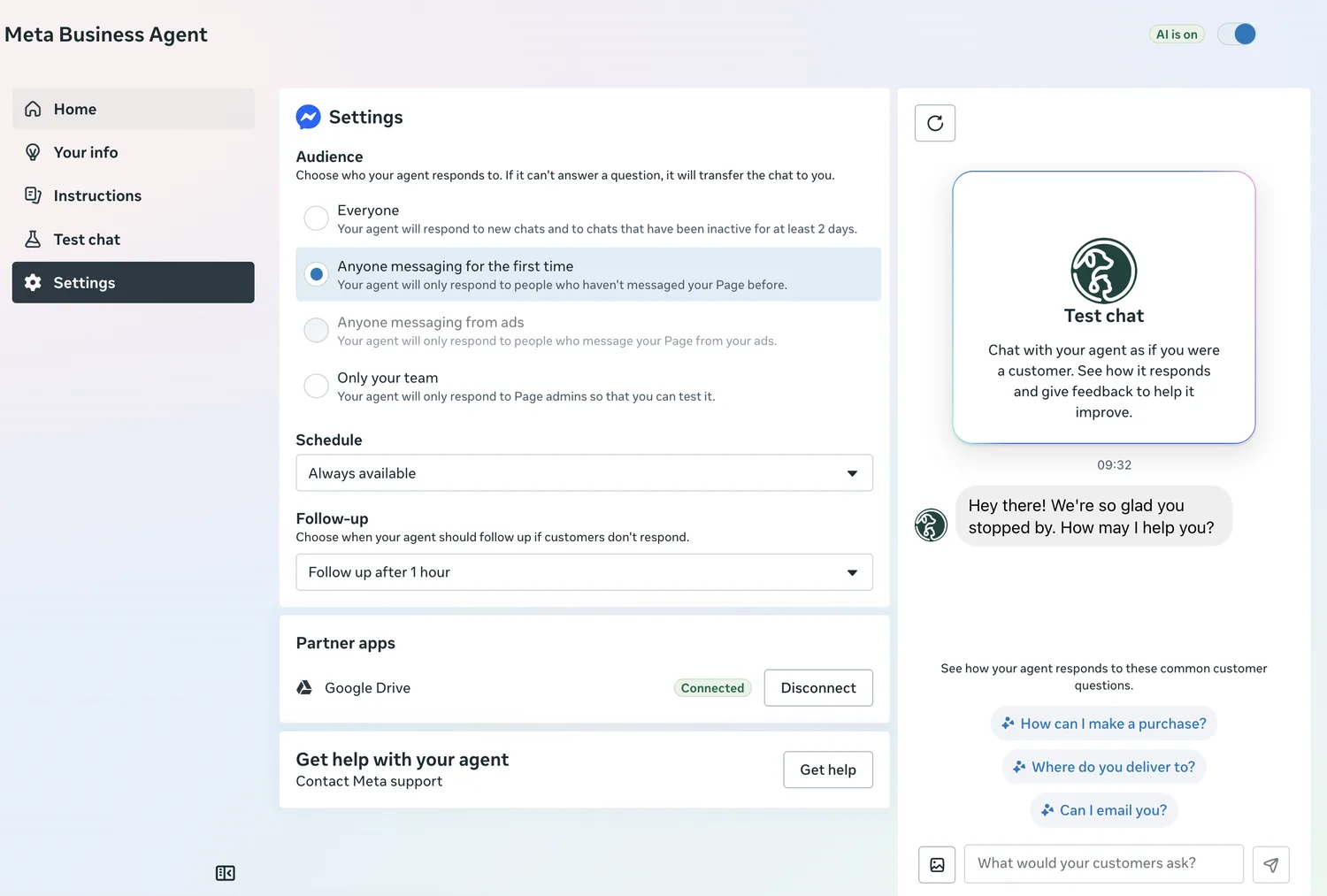
For a first enquiry this worked. Someone asked what is in the food or where The Bon Pet delivers, at any hour, and got an answer from information the team typed in once. Nothing had to be built.
Why The Bon Pet moved to Volty
Four limits showed up in daily use, and each one is something Volty does differently. On 18 November 2026 The Bon Pet's Volty workspace was connected to its Shopify store, its order system and its sales CRM, with 27 automations active and 11 mini apps live.
| On Meta Business Suite | On Volty |
|---|---|
| The agent's information was a copy typed in by hand. The eight answers and the price list went about eight weeks without an edit. | Scheduled automations copy orders, products, discount codes and abandoned checkouts from Shopify into Volty tables, so nobody keeps a second price list. |
| The agent answered first-time messages only. Returning customers waited for a person. | Volty's agent reads the same tables and works in one inbox with the team, for new and returning customers alike. |
| The performance panel reported on the agent: conversations, intent to buy and containment rate. It said nothing about sales, stock or subscriptions. | A morning briefing posts to the team's room at 9am every day, a stock report every Wednesday, a subscription health report every Sunday and a sales summary each month. |
| The follow-up was one timer, an hour after a customer went quiet. | Alerts cover low stock, stock at each pickup point, subscriptions coming up for renewal and customers due to reorder. |
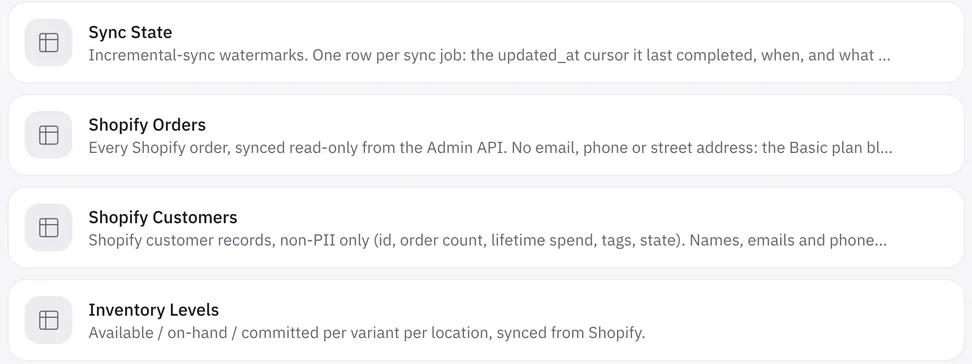
Volty also builds the tools the team asks for, each one waiting for an admin to approve it. The Bon Pet's mini apps include a kitchen board of what to pack, a meal plan quote builder, an inventory forecast, revenue and cohorts, subscriber health and a winback list.
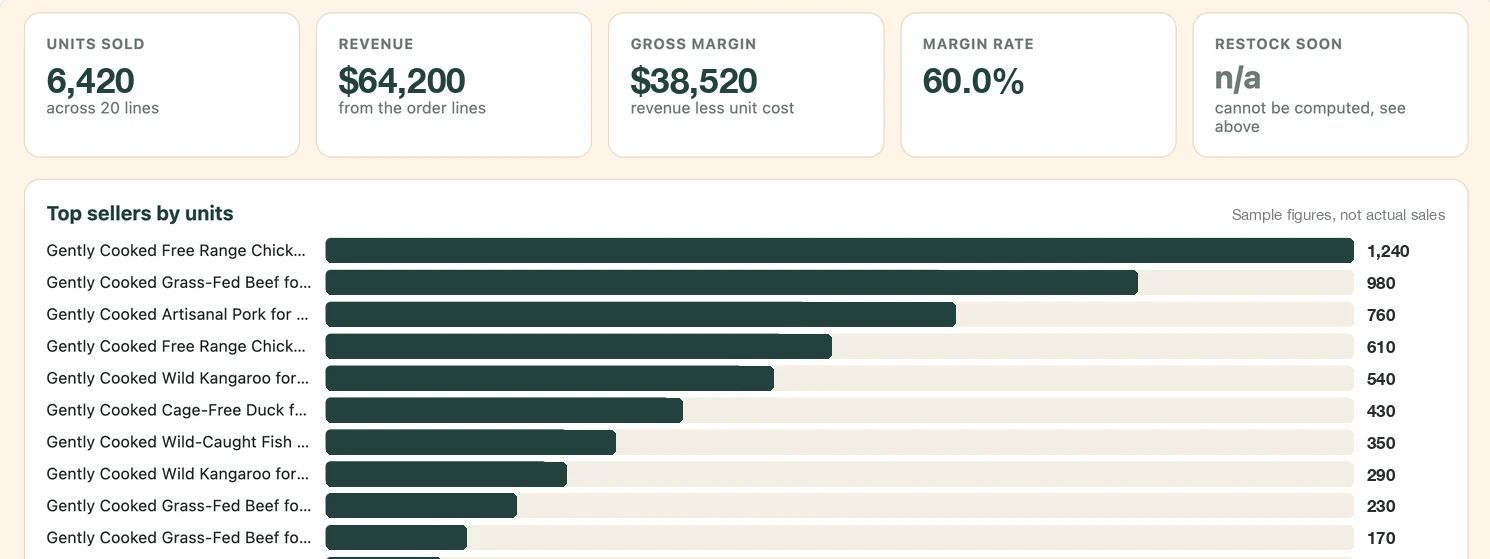
The figures in the Product velocity and margin screenshot are sample numbers, not The Bon Pet's actual sales.
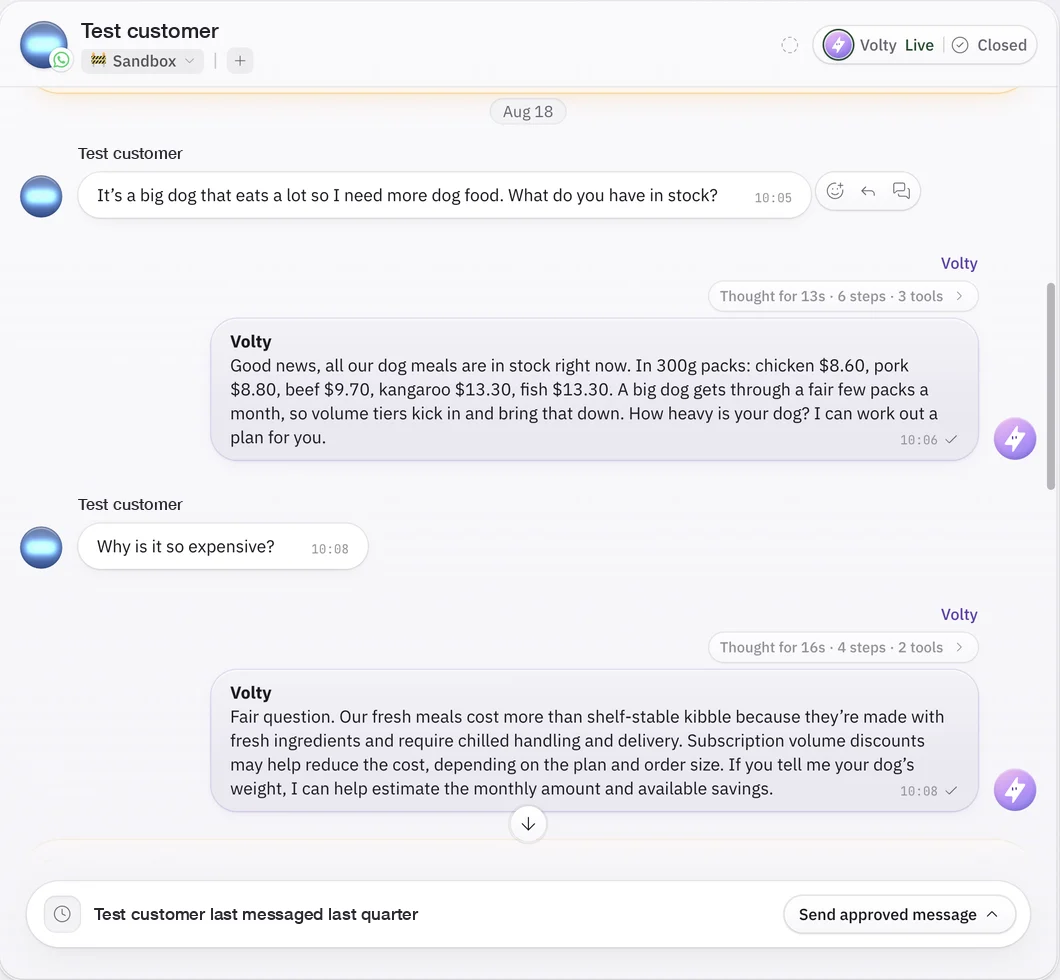
In a test chat, asked what dog food was in stock, Volty answered with the meals in stock and the price of each pack, then asked how heavy the dog was so it could work out a plan.
The full account is in The Bon Pet's case study.

What this looks like with Volty
Volty is an AI helpdesk for builders. Its AI agent answers on WhatsApp, Instagram, Messenger, email and web chat from your website and documents, and every conversation lands in one shared inbox. Each inbox chooses whether Volty replies on its own, writes drafts for your team, or stays out. When a chat needs a person, Volty hands it to the right teammate in the same thread. On WhatsApp, Volty's replies are service messages, so they use the 1,000 free messages a month first, and Meta bills the WhatsApp fees to your own WhatsApp Business account at Meta's rates, with no markup from Volty.
Volty charges for AI through a monthly allowance of AI credits. An AI agent reply or action uses 2 to 5 credits, and a draft or summary for your team uses 1. Volty Plus is US$159 a month on the US price list, with 6 seats, 1,000 monthly active contacts and 15,000 AI credits, which covers roughly 3,000 to 7,500 AI agent replies a month. Prices differ by market and can change, so check the pricing page for yours.
At a few hundred AI replies a month, Meta's agent will usually cost less on the meter. The plan pays for the inbox, the other channels and the integrations around the agent. Cake Inspiration, a custom cake studio, runs its WhatsApp enquiries through Volty: 91% of conversations were resolved by Volty without a human, with more than 800 customer messages handled in one week and the rest handed to a designer. As its founder Kai Yang put it: "I can fix the agent myself now, without waiting on an engineer."

To see how Volty's agent works on your WhatsApp number, start with the WhatsApp AI page.
Frequently asked questions
How much does Meta Business Agent cost?
Meta Business Agent costs US$2.00 per million tokens, one global rate that covers both the AI processing and the delivery of each WhatsApp reply. Meta says a typical reply uses 20,000 to 25,000 tokens, which works out at about 4 to 5 US cents a message. Simple answers use fewer tokens and long, complex ones use more.
Are Meta Business Agent messages free in the free entry point window?
No. Meta's pricing documentation states that Meta Business Agent messages stay charged inside the free entry point window opened by a Click to WhatsApp ad, even though marketing, utility, authentication and service messages are free there. The agent's replies are billed at the token rate wherever they are sent.
Do Meta Business Agent replies count toward the 1,000 free service messages?
No. Meta Business Agent is its own message category, and the free tier of 1,000 messages a month per phone number applies only to service messages. A reply written by Meta's agent is billed by tokens from the first one, while a reply typed by your staff or sent by a third-party AI agent is a service message and uses the free tier first.
Do I need a payment method to use Meta Business Agent?
Yes, to switch it on for all customers. Meta requires a credit or debit card, or an eligible credit line, in Billing Hub before the agent can answer everyone. Without one, you can still run it for an allowlisted set of test contacts.
Which businesses cannot use Meta Business Agent?
Businesses in finance, government, health, alcohol, gambling, over-the-counter drugs and matrimony services cannot use it, according to Meta's eligibility rules. The phone number must also be on the WhatsApp Business Platform, in good standing, in an eligible country, and not already connected to another AI agent.
Is Meta Business Agent cheaper than a third-party AI agent?
On message cost alone, often yes: Meta Business Agent costs about 4 to 5 US cents a reply, and at low volume that is usually less than a third-party agent's plan. A third-party agent sends ordinary service messages that use the 1,000 free messages first and then cost the service rate, plus the vendor's own plan. The plan usually also pays for a team inbox, other channels and integrations, which Meta's agent does not include.